Google Meet integration with Liferay

Introduction:
- The integration between Google Meet and Java is a great way for developers to create applications for users that are tailored to their specific needs.
- Google Meet is an incredibly useful platform for joining meetings and keeping track of events.
- The Google Console provides a comprehensive range of capabilities to manage and control the events, such as creating, updating, and deleting events.
- They also allow for customization of the events, such as setting up reminders, adding notes, and inviting participants.
Prerequisites:
- Liferay (Any version)
- An Google account
- Knowledge of API
Environmental Requirements:
- Browser
- Liferay
- Eclipse IDE
- Gradle
Google Cloud Project Creation and Enable API
We can create Google Meet links using the Google Calendar API. There are a few ways to connect the Google Calendar APIs with the Liferay portal, which are as follows.
- We can generate the Google Calendar event with Java code.
- We need the “credentials.json” file for the authentication and with the help of this authentication, we can authenticate with Google.
- To generate the credentials.json file we have to follow the following steps:
1. Sign in as a Google developer account.
- Visit the following link
- https://developers.google.com/calendar/api
- Please sign in with your Google account.
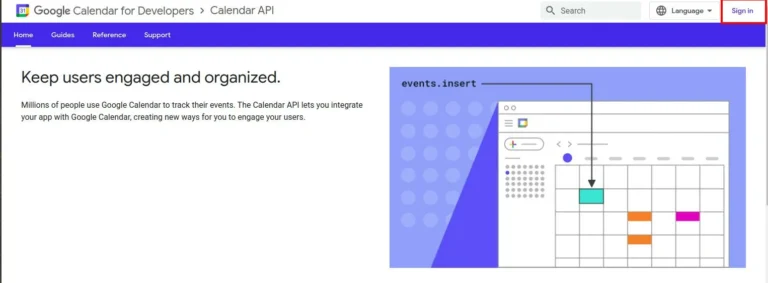
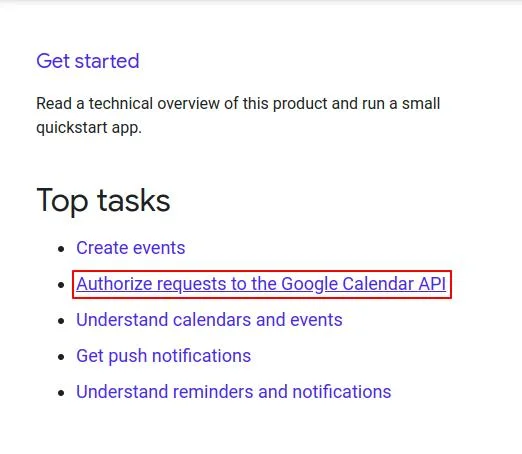
2. After signing in, we have to hit “Authorize requests to the Google Calendar API”.
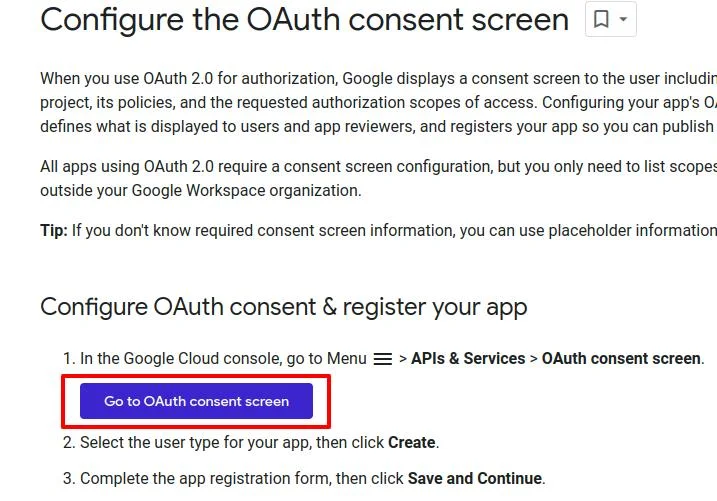
3. You will get the following screen access the “go to OAuth consent screen” button.
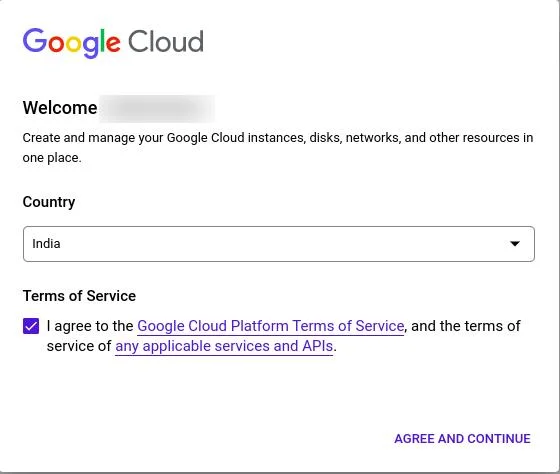
4. You will get the following accept request with your google account name.
5. Create Project
6. Please select the CREATE PROJECT.

7. Google Meet integration with Liferay-5
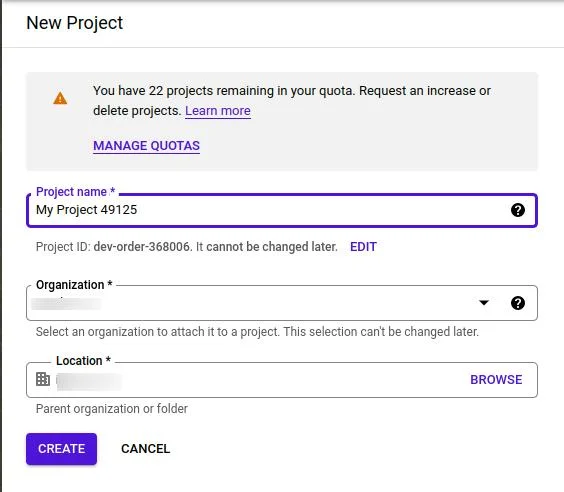
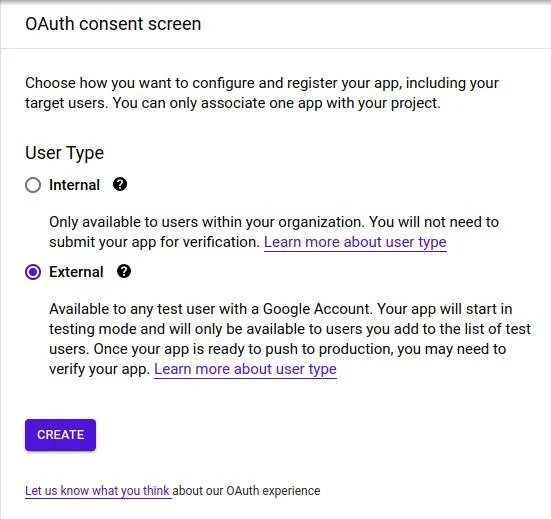
8. Please fill it up and then press the create button. You will get the following screen. Please select the external option.
- Internal:
- External:
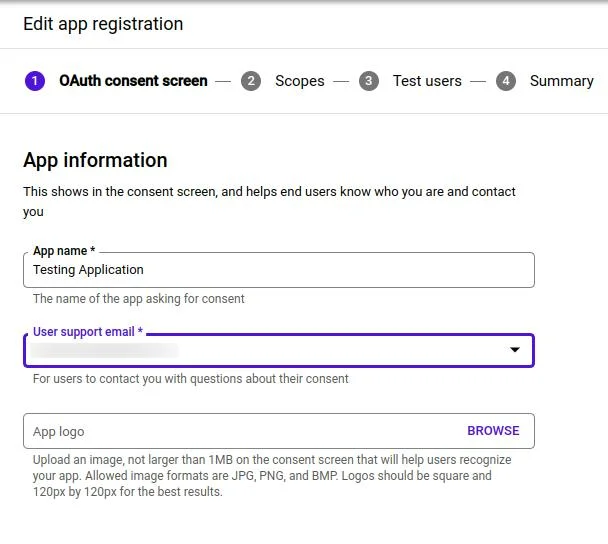
9. After creating the application you will get the following form.
- Please fill in the required field which is following in the form.
- App name:- You can set the app name to whatever you want.
- User support email:- You have to provide the sign-in email address.
- Developer Contact Information:- You can provide your email address or admin email address
- After filling in the required fields, please click on “Save and Continue”.
10. You will get the scope screen of the form you just have to press the SAVE AND CONTINUE button.
11. You will get the Test User screen of the form you just have to press the SAVE AND CONTINUE button.
12. You will get the summary screen of the form and you just have to go to the dashboard.
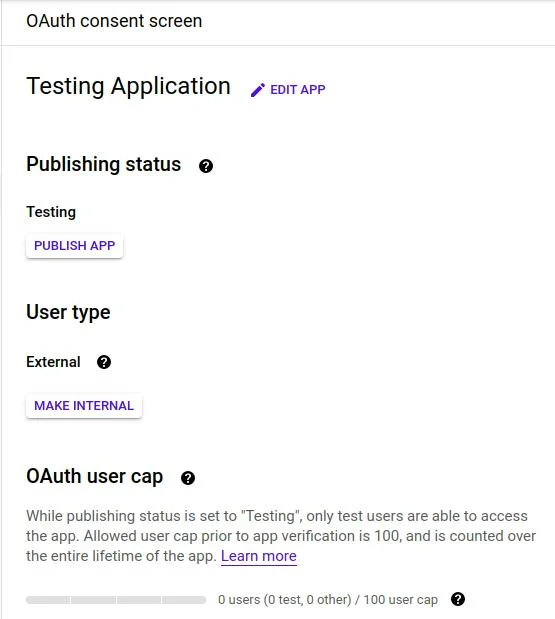
13. Your newly created application will be displayed like the following, with user type.
14. Create OAuth 2.0 credentials.
- Now go to the credentials section.
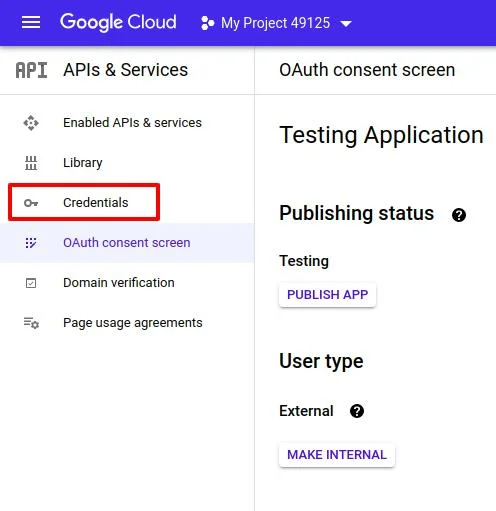
15. You will get the following screen. Now we have to create new client credentials.
- Click on the CREATE CREDENTIALS BUTTON
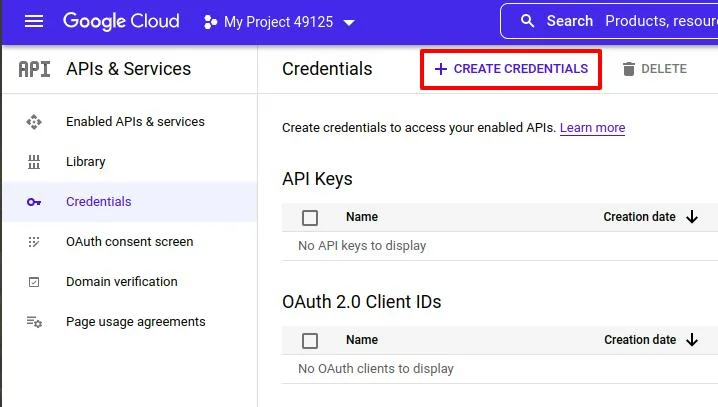
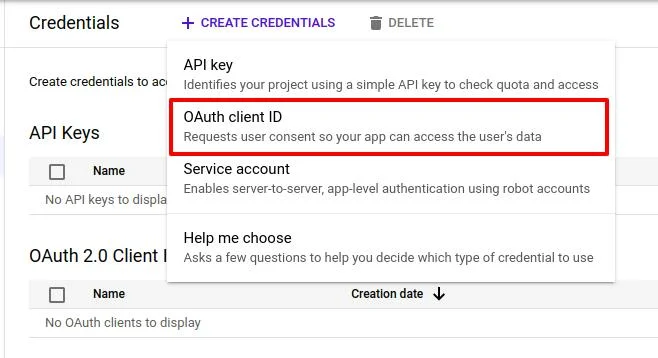
16. You have to select the “OAuth 2.0 Client ID” option to create the OAuth 2.0 client credentials.
18. Now Select the Application Type -> Web Application.
19. Now enter the Authorized JavaScript origins
1http://localhost20. Now enter the Authorized redirect URIs
1http://localhost:9080/Callback1http://localhost:808021. Now create the OAuth client ID. You will be redirected to the credentials page with one record added to the OAuth2.0 client.

22. Download the JSON File
- Now we have to enable the google calendar API.
- Go to the “Enabled API & Services ”
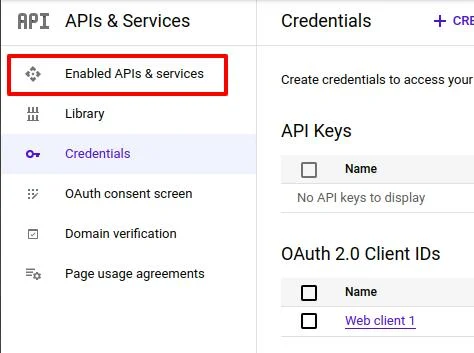
22. Select “ENABLE APIS AND SERVICES”
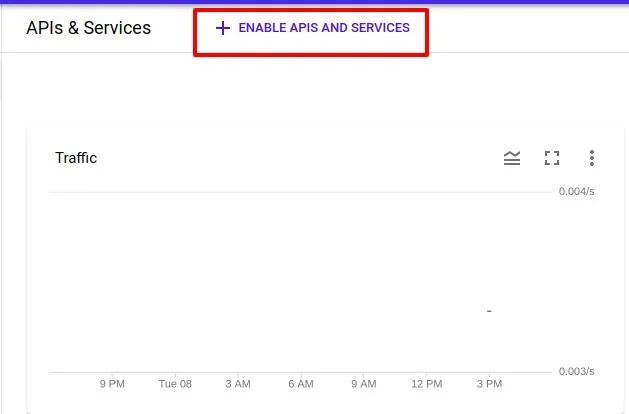
23. Now search for “Google Calendar API” in the search bar.
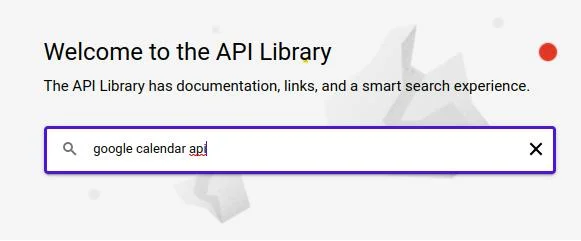
23. You will get the following results.
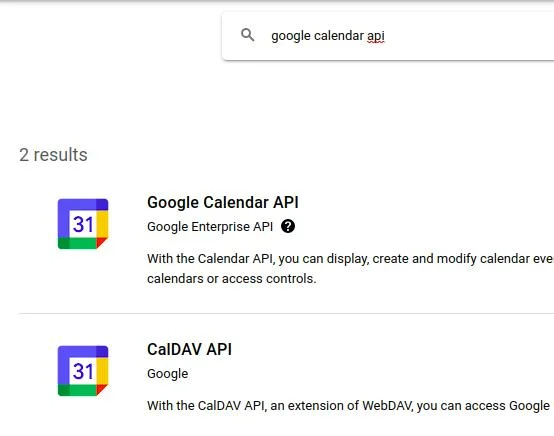
24. Select the “Google Calendar API”.
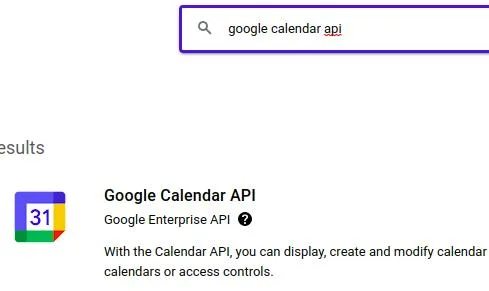
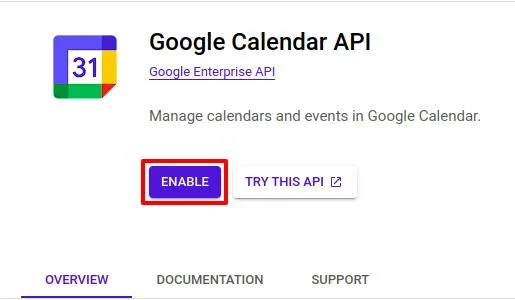
25. Enable the Google Calendar API.
Liferay Rest Builder
Here I’m creating one rest builder to perform create, update, get, and delete operations on Google Calendar events. Follow these steps to create a Liferay rest builder and call the Google Calendar APIs:
1. First, Create Liferay Workspace and a rest builder (If you don’t know how to create a rest builder then take reference from here).
2. Here I have created “google-calendar-rest” named Rest Builder.
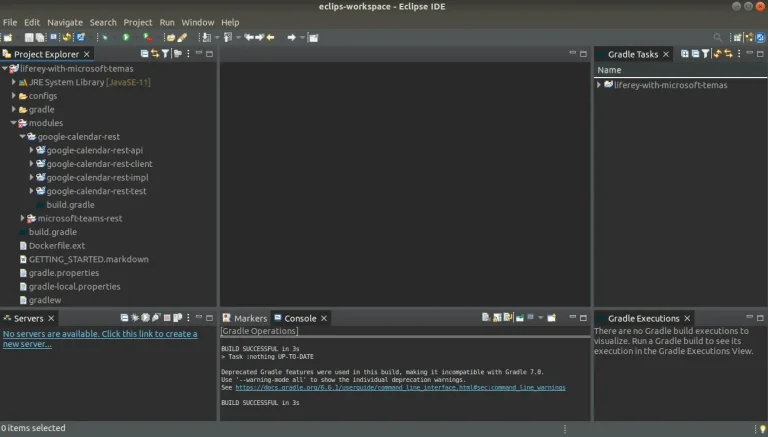
3. Go to the google-calendar-rest-impl -> rest-openapi.yaml file and write the below text.
1// rest-openapi.yaml
2info:
3    description: "GoogleCalendarRest REST API"
4    license:
5        name: "Apache 2.0"
6        url: "http://www.apache.org/licenses/LICENSE-2.0.html"
7    title: "GoogleCalendarRest"
8    version: v1.0
9openapi: 3.0.1
10paths:
11  "/update-google-meet-link":
12    post:
13      operationId: updateGoogleMeetLink
14      requestBody:
15        content:
16          application/json:
17            schema:
18              $ref: "#/components/schemas/Meet"
19          application/xml:
20            schema:
21              $ref: "#/components/schemas/Meet"
22      responses:
23        200:
24          content:
25            application/json:
26              schema:
27                $ref: "#/components/schemas/Meet"
28            application/xml:
29              schema:
30                $ref: "#/components/schemas/Meet"
31          description: ""
32      tags: ["Meet"]
33  "/get-google-meet-link":
34    get:
35      operationId: getGoogleMeetLink
36      parameters:
37        - in: query
38          name: eventId
39          required: true
40          schema:
41            type: string
42      responses:
43        200:
44          content:
45            application/json:
46              schema:
47                $ref: "#/components/schemas/Meet"
48            application/xml:
49              schema:
50                $ref: "#/components/schemas/Meet"
51          description: ""
52        404:
53          description: "Meet not found"
54        500:
55          description: "Internal server error"
56      tags: ["Meet"]
57  "/delete-google-meet-link":
58    delete:
59      operationId: deleteGoogleMeetLink
60      parameters:
61        - in: query
62          name: eventId
63          required: true
64          schema:
65            type: string
66      responses:
67        200:
68          content:
69            application/json:
70              schema:
71                $ref: "#/components/schemas/Meet"
72            application/xml:
73              schema:
74                $ref: "#/components/schemas/Meet"
75          description: ""
76      tags: ["Meet"]
77components:
78  schemas:
79    Meet:
80      description: adding or updating google meet link
81      properties:
82        eventId:
83          description: The eventId.
84          type: string
85        title:
86          description: The title.
87          type: string
88        description:
89          description: The description.
90          type: string
91        setDate:
92          description: The setDate in "yyyy-MM-dd HH:mm" format.
93          type: string
94        endDate:
95          description: The endDate in "yyyy-MM-dd HH:mm" format.
96          type: string
97        timeZone:
98          description: The timeZone.
99          type: string
100        location:
101          description: The location.
102          type: string
103        meetLink:
104          description: The meetLink.
105          type: string
106        repeat:
107          description: The MeetLink.
108          type: integer
109        emailAddress:
110          description: The emailAddress.
111          type: array
112          items:
113            type: string
114        status:
115            $ref: "#/components/schemas/Status"
116    Status:
117      properties:
118        statusMessage:
119          type: string
120        statusCode:
121          type: integer
4. Now, build rest of it, and you will see the below files. Open the “MeetResourceImpl” class file.
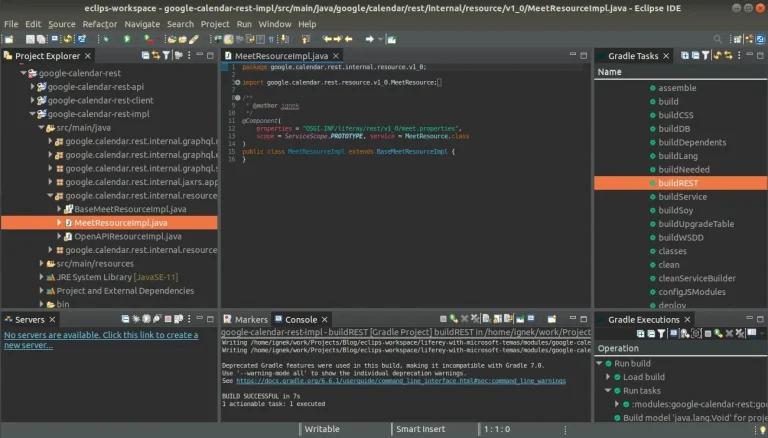
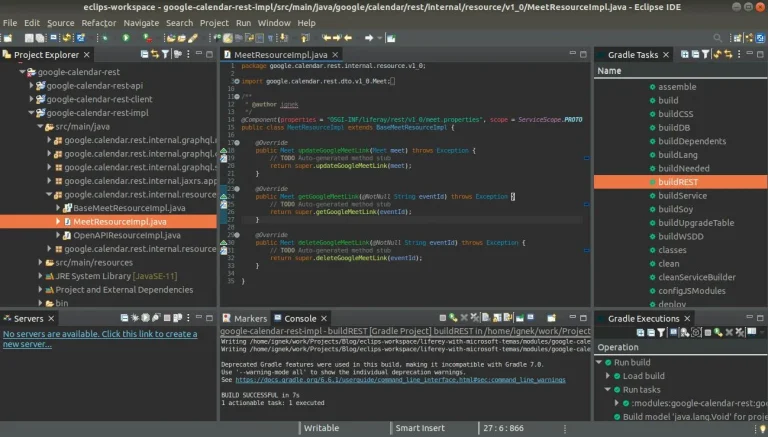
5. Add methods in the “MeetResourceImpl” class file (updateGoogleMeetLink, getGoogleMeetLink, and deleteGoogleMeetLink).
6. Now go to modules -> google-calendar-rest -> google-calendar-rest-impl -> build.gradle. And replace with the below lines.
1// build.gradle
2dependencies {
3	compile project(":modules:google-calendar-rest:google-calendar-rest-api")
4
5	compileOnly group: "com.liferay.portal", name: "release.portal.api"
6	compileOnly group: "javax.xml.bind", name: "jaxb-api", version: "2.3.0"
7
8	compile group: 'org.apache.httpcomponents', name: 'httpclient'
9	compile group: 'org.apache.httpcomponents', name: 'httpcore'
10	compileOnly group: 'javax.websocket', name: 'javax.websocket-api'
11
12	implementation group: 'javax.mail', name: 'mail', version: '1.4.1'
13
14	cssBuilder group: "com.liferay", name: "com.liferay.css.builder", version: "3.0.3"
15
16	implementation 'com.google.api-client:google-api-client:2.0.0'
17    implementation 'com.google.oauth-client:google-oauth-client-jetty:1.34.1'
18    implementation 'com.google.apis:google-api-services-calendar:v3-rev20220715-2.0.0'
19}
20
21group = "google.calendar.rest"
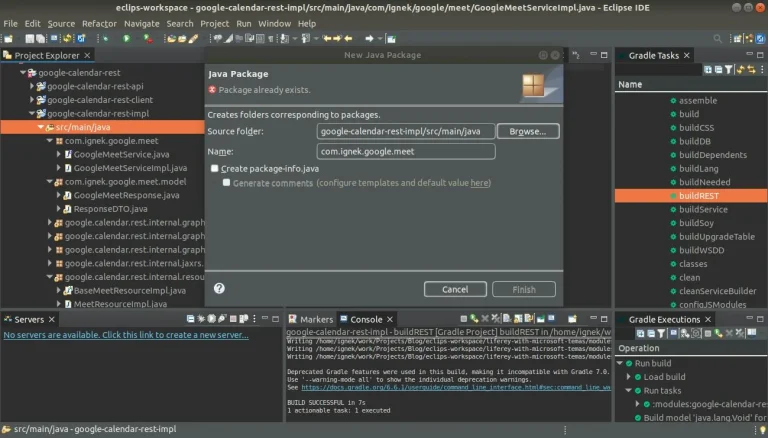
7. Now, create a package “com.ignek.google.meet” in the “google-calendar-rest-impl/src/main/java” folder.
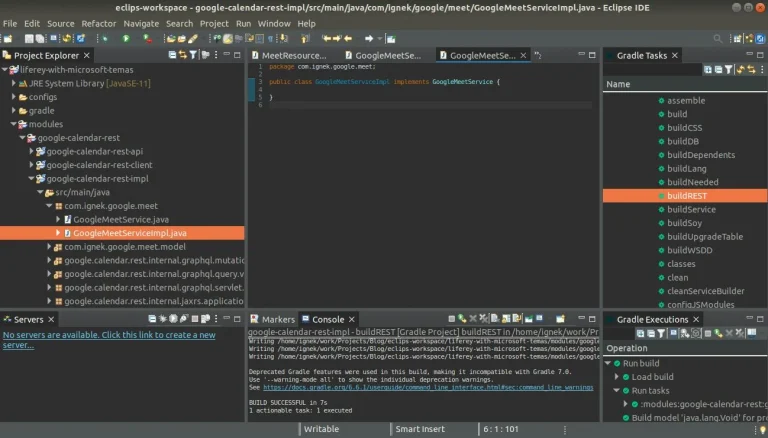
8. Now, add an interface “GoogleMeetService” and a class “GoogleMeetServiceImpl” which implements “GoogleMeetService”.
9. Now, create a package “com.ignek.google.meet.model” in the “google-calendar-rest-impl/src/main/java” folder. and create a class “ResponseDTO” that implements serializable.
1// ResponseDTO.java
2package com.ignek.google.meet.model;
3
4import java.io.Serializable;
5
6import javax.ws.rs.core.Response;
7
8public class ResponseDTO implements Serializable {
9
10	protected static Response.Status STATUS_OK = Response.Status.OK;
11	protected static Response.Status STATUS_ERROR = Response.Status.INTERNAL_SERVER_ERROR;
12
13	private final int status;
14	private final String message;
15
16	private ResponseDTO(int status, String message) {
17		this.status = status;
18		this.message = message;
19	}
20
21	protected ResponseDTO(Response.Status status) {
22		this(status.getStatusCode(), status.getReasonPhrase());
23	}
24
25	protected ResponseDTO(Response.Status status, String message) {
26		this(status.getStatusCode(), status.getReasonPhrase() + ": " + message);
27	}
28
29	public static ResponseDTO ok() {
30		return new ResponseDTO(STATUS_OK);
31	}
32
33	public static ResponseDTO fail() {
34		return new ResponseDTO(STATUS_ERROR);
35	}
36
37	public static ResponseDTO error(String message) {
38		return new ResponseDTO(STATUS_ERROR, message);
39	}
40
41	public int getStatus() {
42		return status;
43	}
44
45	public String getMessage() {
46		return message;
47	}
48
49}
10. Now, In the same package “com.ignek.google.meet.model” create a class “GoogleMeetResponse” that extends ResponseDTO.
1// GoogleMeetResponse.java
2package com.ignek.google.meet.model;
3
4import com.liferay.petra.string.StringPool;
5
6public class GoogleMeetResponse extends ResponseDTO {
7
8	private final String eventId;
9	private final String link;
10
11	private GoogleMeetResponse(String link, String eventId) {
12		super(STATUS_OK);
13		this.eventId = eventId;
14		this.link = link;
15	}
16
17	private GoogleMeetResponse(String message) {
18		super(STATUS_ERROR, message);
19		this.eventId = StringPool.BLANK;
20		this.link = StringPool.BLANK;
21	}
22
23	public static GoogleMeetResponse of(String link, String eventId) {
24		return new GoogleMeetResponse(link, eventId);
25	}
26
27	public static GoogleMeetResponse fail(String message) {
28		return new GoogleMeetResponse(message);
29	}
30
31	public String getEventId() {
32		return eventId;
33	}
34
35	public String getLink() {
36		return link;
37	}
38
39}
11. Now, go to the “GoogleMeetService” file. And write the below code.
1// GoogleMeetService.java
2package com.ignek.google.meet;
3
4import com.ignek.google.meet.model.GoogleMeetResponse;
5
6public interface GoogleMeetService {
7
8	GoogleMeetResponse updateGoogleMeetEvent(String eventId, String title, String location, String[] emails,
9 String description, String startTime, String endTime, String timeZone, Integer repeat);
10
11	String getGoogleMeetLink(String eventId);
12
13	void deleteGoogleMeetEvent(String eventId);
14
15}
12. Now, go to the “GoogleMeetServiceImpl” file. And write the below code.
1// GoogleMeetServiceImpl.java
2package com.ignek.google.meet;
3
4import java.io.FileNotFoundException;
5import java.io.IOException;
6import java.io.InputStream;
7import java.io.InputStreamReader;
8import java.text.DateFormat;
9import java.text.ParseException;
10import java.text.SimpleDateFormat;
11import java.util.ArrayList;
12import java.util.Arrays;
13import java.util.Collections;
14import java.util.Date;
15import java.util.List;
16import java.util.TimeZone;
17import java.util.UUID;
18
19import com.google.api.client.auth.oauth2.Credential;
20import com.google.api.client.extensions.java6.auth.oauth2.AuthorizationCodeInstalledApp;
21import com.google.api.client.extensions.jetty.auth.oauth2.LocalServerReceiver;
22import com.google.api.client.googleapis.auth.oauth2.GoogleAuthorizationCodeFlow;
23import com.google.api.client.googleapis.auth.oauth2.GoogleClientSecrets;
24import com.google.api.client.googleapis.javanet.GoogleNetHttpTransport;
25import com.google.api.client.http.javanet.NetHttpTransport;
26import com.google.api.client.json.gson.GsonFactory;
27import com.google.api.client.util.DateTime;
28import com.google.api.client.util.store.FileDataStoreFactory;
29import com.google.api.services.calendar.Calendar;
30import com.google.api.services.calendar.CalendarScopes;
31import com.google.api.services.calendar.model.ConferenceData;
32import com.google.api.services.calendar.model.ConferenceSolutionKey;
33import com.google.api.services.calendar.model.CreateConferenceRequest;
34import com.google.api.services.calendar.model.Event;
35import com.google.api.services.calendar.model.EventAttendee;
36import com.google.api.services.calendar.model.EventDateTime;
37import com.google.api.services.calendar.model.EventReminder;
38import com.ignek.google.meet.model.GoogleMeetResponse;
39import com.liferay.petra.string.StringPool;
40import com.liferay.portal.kernel.log.Log;
41import com.liferay.portal.kernel.log.LogFactoryUtil;
42import com.liferay.portal.kernel.util.Validator;
43
44@Component(immediate = true, service = GoogleMeetService.class)
45public class GoogleMeetServiceImpl implements GoogleMeetService {
46
47	@Override
48	public GoogleMeetResponse updateGoogleMeetEvent(String eventId, String title, String location, String[] emails,
49			String description, String startTime, String endTime, String timeZone, Integer repeat) {
50		try {
51			final NetHttpTransport HTTP_TRANSPORT = GoogleNetHttpTransport.newTrustedTransport();
52			Calendar service = new Calendar.Builder(HTTP_TRANSPORT, GsonFactory.getDefaultInstance(),
53getCredentials(HTTP_TRANSPORT)).setApplicationName(APPLICATION_NAME).build();
54			String calendarId = "primary";
55
56			Event event = Validator.isNull(eventId) ? new Event() : service.events().get(calendarId, eventId).execute();
57
58			event.setSummary(title);
59			event.setLocation(location);
60			event.setDescription(description);
61
62			TimeZone userTimeZone = TimeZone.getTimeZone(timeZone);
63			DateTime startDateTime = new DateTime(new Date(convertDate(startTime).getTime()
64- userTimeZone.getRawOffset()));
65			EventDateTime start = new EventDateTime().setDateTime(startDateTime).setTimeZone(timeZone);
66			event.setStart(start);
67
68			DateTime endDateTime = new DateTime(new Date(convertDate(endTime).getTime()
69- userTimeZone.getRawOffset()));
70			EventDateTime end = new EventDateTime().setDateTime(endDateTime).setTimeZone(timeZone);
71			event.setEnd(end);
72
73			ConferenceSolutionKey conferenceSKey = new ConferenceSolutionKey();
74			conferenceSKey.setType( "hangoutsMeet");
75			CreateConferenceRequest createConferenceReq = new CreateConferenceRequest();
76			createConferenceReq.setRequestId(UUID.randomUUID().toString());
77			createConferenceReq.setConferenceSolutionKey(conferenceSKey);
78			ConferenceData conferenceData = new ConferenceData();
79			conferenceData.setCreateRequest(createConferenceReq);
80			event.setConferenceData(conferenceData);
81			List recurrences = new ArrayList<>();
82			recurrences.add(getrecurrenceByRepeatType(repeat));
83
84			event.setRecurrence(recurrences);
85			List attendees = new ArrayList<>();
86			for (String email : emails) {
87				EventAttendee attendee = new EventAttendee();
88				attendees.add(attendee.setEmail(email));
89			}
90			event.setAttendees(attendees);
91
92			EventReminder[] reminderOverrides = new EventReminder[] {
93					new EventReminder().setMethod("email").setMinutes(24 * 60),
94					new EventReminder().setMethod("popup").setMinutes(10) };
95			Event.Reminders reminders = new Event.Reminders().setUseDefault(false)
96.setOverrides(Arrays.asList(reminderOverrides));
97			event.setReminders(reminders);
98
99			event = Validator.isNull(eventId)
100					? service.events().insert(calendarId, event).setConferenceDataVersion(1)
101.setSendNotifications(true).execute()
102					: service.events().update(calendarId, eventId, event).execute();
103
104			return GoogleMeetResponse.of(event.getHangoutLink(), event.getId());
105		} catch (Exception e) {
106			log.error(e.getMessage(), e);
107			return GoogleMeetResponse.fail(e.getMessage());
108		}
109	}
110
111	@Override
112	public String getGoogleMeetLink(String eventId) {
113		try {
114			final NetHttpTransport HTTP_TRANSPORT = GoogleNetHttpTransport.newTrustedTransport();
115			Calendar service = new Calendar.Builder(HTTP_TRANSPORT, GsonFactory.getDefaultInstance(),
116 getCredentials(HTTP_TRANSPORT)).setApplicationName(APPLICATION_NAME).build();
117			String calendarId = "primary";
118			Event event = Validator.isNull(eventId) ? new Event() : service.events().get(calendarId, eventId)
119.execute();
120			return event.getHangoutLink();
121		} catch (Exception e) {
122			log.error(e.getMessage(), e);
123		}
124		return StringPool.BLANK;
125	}
126
127	@Override
128	public void deleteGoogleMeetEvent(String eventId) {
129		try {
130			final NetHttpTransport HTTP_TRANSPORT = GoogleNetHttpTransport.newTrustedTransport();
131			Calendar service = new Calendar.Builder(HTTP_TRANSPORT, GsonFactory.getDefaultInstance(),
132 getCredentials(HTTP_TRANSPORT)).setApplicationName(APPLICATION_NAME).build();
133			String calendarId = "primary";
134			service.events().delete(calendarId, eventId).execute();
135		} catch (Exception e) {
136			log.error(e.getMessage(), e);
137		}
138	}
139
140	private String getrecurrenceByRepeatType(int repeat) {
141		if (repeat == REPEAT_TYPE_NO) {
142			return "RRULE:FREQ=DAILY;COUNT=1";
143		}
144		if (repeat == REPEAT_TYPE_DAILY) {
145			return "RRULE:FREQ=DAILY;INTERVAL=1";
146		}
147		if (repeat == REPEAT_TYPE_WEEKLY) {
148			return "RRULE:FREQ=WEEKLY;BYDAY=MO;INTERVAL=1";
149		}
150		if (repeat == REPEAT_TYPE_MONTHLY) {
151			return "RRULE:FREQ=MONTHLY;BYMONTHDAY=1;INTERVAL=1";
152		}
153		if (repeat == REPEAT_TYPE_YEARLY) {
154			return "RRULE:FREQ=YEARLY;BYMONTH=1;BYMONTHDAY=1";
155		}
156		return StringPool.BLANK;
157	}
158
159	private Date convertDate(String date) throws ParseException {
160	    DateFormat formatter = new SimpleDateFormat("yyyy-MM-dd HH:mm");
161	    return formatter.parse(date);
162	}
163
164	private static Credential getCredentials(final NetHttpTransport HTTP_TRANSPORT) throws IOException {
165
166		InputStream inputStream = GoogleMeetServiceImpl.class.getResourceAsStream("/credentials.json");
167// Add credentials.json to */src/main/resources/credentials.json
168		if (Validator.isNull(inputStream)) {
169			throw new FileNotFoundException("Resource not found: credentials.json");
170		}
171
172		GoogleClientSecrets clientSecrets = GoogleClientSecrets.load(GsonFactory.getDefaultInstance(),
173new InputStreamReader(inputStream));
174		GoogleAuthorizationCodeFlow flow = new GoogleAuthorizationCodeFlow
175				.Builder(HTTP_TRANSPORT, GsonFactory.getDefaultInstance(), clientSecrets,
176Collections.singletonList(CalendarScopes.CALENDAR))
177				.setDataStoreFactory(new FileDataStoreFactory(new java.io.File("tokens")))
178				.setAccessType("offline")
179				.setApprovalPrompt("force")
180				.setScopes(CalendarScopes.all())
181				.build();
182
183		LocalServerReceiver receiver = new LocalServerReceiver.Builder().setPort(9080).build();
184//check port is already assigned or not and put same port number as entered in redirect URIs for Callback
185
186		return new AuthorizationCodeInstalledApp(flow, receiver).authorize("user");
187	}
188
189	private static final String APPLICATION_NAME = "Testing Application";
190	private static final int REPEAT_TYPE_NO = 0;
191	private static final int REPEAT_TYPE_DAILY = 1;
192	private static final int REPEAT_TYPE_WEEKLY = 2;
193	private static final int REPEAT_TYPE_MONTHLY = 3;
194	private static final int REPEAT_TYPE_YEARLY = 4;
195	private static final Log log = LogFactoryUtil.getLog(GoogleMeetServiceImpl.class);
196}
13. Please replace APPLICATION_NAME in above file with your data that we renamed while creating the application in Google Console.
14. Now, go to the “MeetResourceImpl” file. And write the below code.
1//MeetResourceImpl.java
2package google.calendar.rest.internal.resource.v1_0;
3
4import javax.validation.constraints.NotNull;
5import javax.ws.rs.core.Response;
6
7import org.osgi.service.component.annotations.Component;
8import org.osgi.service.component.annotations.Reference;
9import org.osgi.service.component.annotations.ServiceScope;
10
11import com.ignek.google.meet.GoogleMeetService;
12import com.ignek.google.meet.model.GoogleMeetResponse;
13
14import google.calendar.rest.dto.v1_0.Meet;
15import google.calendar.rest.dto.v1_0.Status;
16import google.calendar.rest.resource.v1_0.MeetResource;
17
18/**
19 * @author ignek
20 */
21@Component(properties = "OSGI-INF/liferay/rest/v1_0/meet.properties", scope = ServiceScope.PROTOTYPE, service = MeetResource.class)
22public class MeetResourceImpl extends BaseMeetResourceImpl {
23
24	@Reference
25	private GoogleMeetService googleMeetService;
26
27	@Override
28	public Meet updateGoogleMeetLink(Meet meet) throws Exception {
29		String eventId = meet.getEventId();
30		String title = meet.getTitle();
31		String description = meet.getDescription();
32		String location = meet.getLocation();
33		String setDate = meet.getSetDate();
34		String endDate = meet.getEndDate();
35		String timeZone = meet.getTimeZone();
36		int repeat = meet.getRepeat();
37		String[] emailAddresses = meet.getEmailAddress();
38
39		GoogleMeetResponse googleMeetResponse = googleMeetService.updateGoogleMeetEvent(eventId, title, location,
40emailAddresses, description, setDate, endDate, timeZone, repeat);
41		String meetLink = googleMeetResponse.getLink();
42		eventId = googleMeetResponse.getEventId();
43
44		Status status = new Status();
45		status.setStatusCode(googleMeetResponse.getStatus());
46		status.setStatusMessage(googleMeetResponse.getMessage());
47		meet.setStatus(status);
48		meet.setEventId(eventId);
49		meet.setMeetLink(meetLink);
50
51		return meet;
52	}
53
54	@Override
55	public Meet getGoogleMeetLink(@NotNull String eventId) throws Exception {
56		Meet meet = new Meet();
57		String meetLink = googleMeetService.getGoogleMeetLink(eventId);
58		meet.setMeetLink(meetLink);
59		meet.setEventId(eventId);
60
61		return meet;
62	}
63
64	@Override
65	public Meet deleteGoogleMeetLink(@NotNull String eventId) throws Exception {
66		Meet meet = new Meet();
67		Status status = new Status();
68		try {
69			googleMeetService.deleteGoogleMeetEvent(eventId);
70			status.setStatusCode(Response.Status.OK.getStatusCode());
71			status.setStatusMessage("Deleted Successfully");
72		} catch (Exception e) {
73			status.setStatusCode(Response.Status.INTERNAL_SERVER_ERROR.getStatusCode());
74			status.setStatusMessage(e.getMessage());
75		}
76		meet.setStatus(status);
77
78		return meet;
79	}
80
81}
15. Now, deploy the rest module and you can test the above rest-apis using GraphQL.
16. Here, you can find graphQL for adding or updating Google Calendar events. For adding an event you have to pass “eventId” as blank and for updating an event you have to pass the eventId of that event.
1mutation ($meet: InputMeet!) {
2  updateGoogleMeetLink(meet: $meet) {
3    eventId
4    meetLink
5    status {
6      statusCode
7      statusMessage
8    }
9  }
10}
11
12/* Query Variables */
13
14{
15  "meet": {
16    "title": "My first meet link",
17    "description": "test google meet link",
18    "emailAddress": [
19      "test@yopmail.com",
20      "test1@yopmail.com"
21    ],
22    "setDate": "2023-05-16 13:15",
23    "endDate": "2023-05-16 14:15",
24    "eventId": "",
25    "location": "my house",
26    "timeZone": "GMT+5:30",
27    "repeat": 0
28  }
29}
17. Here is what you can pass in “repeat”:
- Repeat No = 0;
- Repeat Daily = 1;
- Repeat Weekly = 2;
- Repeat Monthly = 3;
- Repeat Yearly = 4;
18. When you run this API for the first time, it will ask for authentication. A url can be found in terminal for authentication.

19. Run that url in your browser. You will be asked to select a Google account.
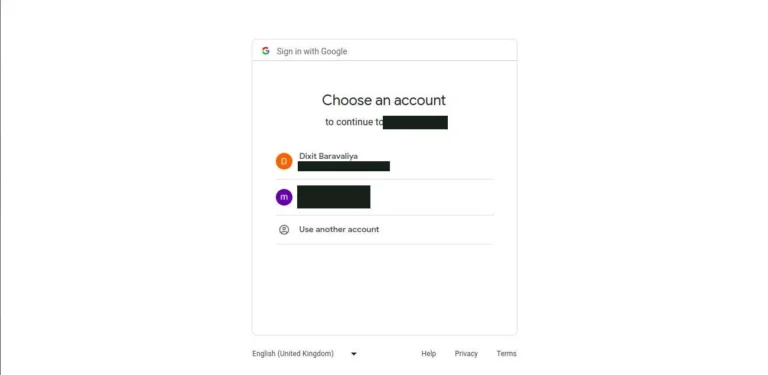
20. The following screen will appear after that.
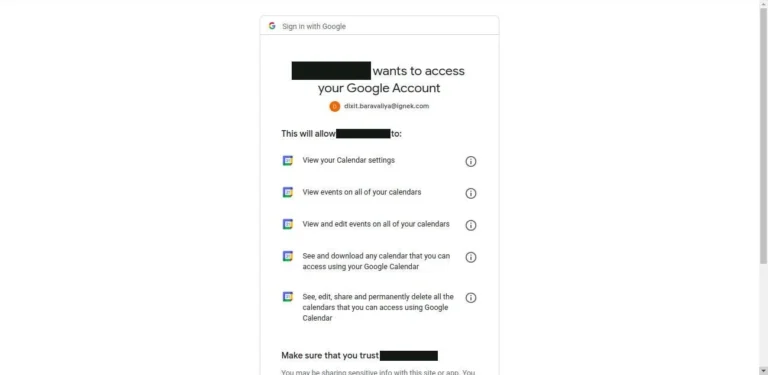
21. Just click on “Allow”. It will redirect to the url that is entered in “redirect url” In my case, it will redirect to “localhost:9099/Callback”.
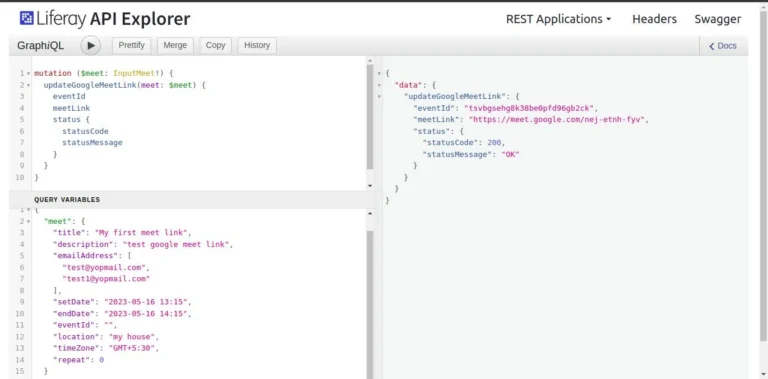
22. Here, you can find graphQL for getting Google Meet link.
1{
2  googleMeetLink(eventId: "") {
3    meetLink
4    eventId
5  }
6}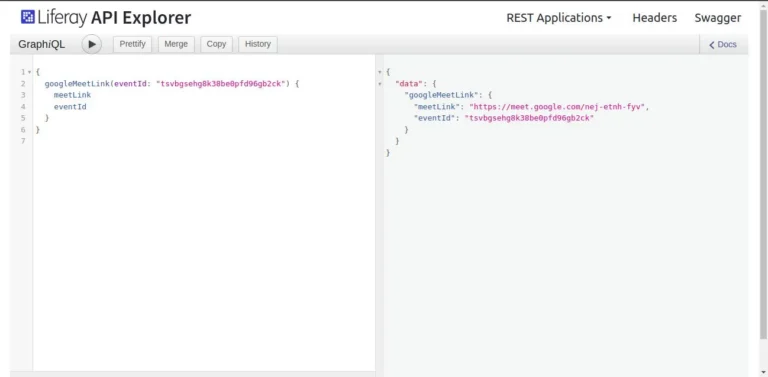
23. Here, you can find graphQL for deleting Google Meet events.
1mutation {
2  deleteGoogleMeetLink(eventId: "") {
3    status {
4      statusCode
5      statusMessage
6    }
7  }
8}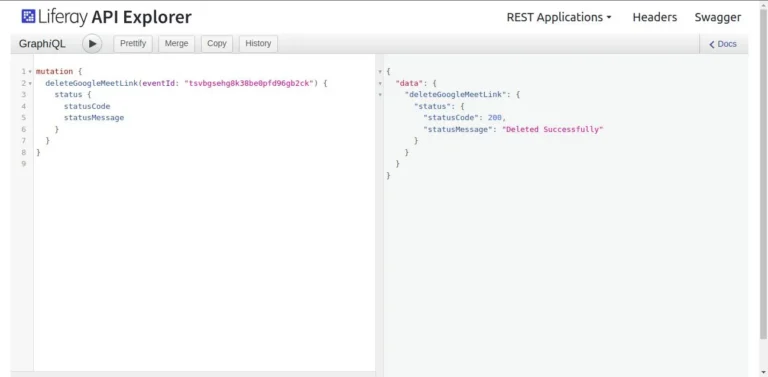
Note*: Google APIs return many parameters in their responses. As an eventId, we are taking “id” and as a team link, we are taking “hangoutLink”.
Here is an example response:
1{
2  "kind": "calendar#event",
3  "etag": etag,
4  "id": string,
5  "status": string,
6  "htmlLink": string,
7  "created": datetime,
8  "updated": datetime,
9  "summary": string,
10  "description": string,
11  "location": string,
12  "colorId": string,
13  "creator": {
14    "id": string,
15    "email": string,
16    "displayName": string,
17    "self": boolean
18  },
19  "organizer": {
20    "id": string,
21    "email": string,
22    "displayName": string,
23    "self": boolean
24  },
25  "start": {
26    "date": date,
27    "dateTime": datetime,
28    "timeZone": string
29  },
30  "end": {
31    "date": date,
32    "dateTime": datetime,
33    "timeZone": string
34  },
35  "endTimeUnspecified": boolean,
36  "recurrence": [
37    string
38  ],
39  "recurringEventId": string,
40  "originalStartTime": {
41    "date": date,
42    "dateTime": datetime,
43    "timeZone": string
44  },
45  "transparency": string,
46  "visibility": string,
47  "iCalUID": string,
48  "sequence": integer,
49  "attendees": [
50    {
51      "id": string,
52      "email": string,
53      "displayName": string,
54      "organizer": boolean,
55      "self": boolean,
56      "resource": boolean,
57      "optional": boolean,
58      "responseStatus": string,
59      "comment": string,
60      "additionalGuests": integer
61    }
62  ],
63  "attendeesOmitted": boolean,
64  "extendedProperties": {
65    "private": {
66      (key): string
67    },
68    "shared": {
69      (key): string
70    }
71  },
72  "hangoutLink": string,
73  "conferenceData": {
74    "createRequest": {
75      "requestId": string,
76      "conferenceSolutionKey": {
77        "type": string
78      },
79      "status": {
80        "statusCode": string
81      }
82    },
83    "entryPoints": [
84      {
85        "entryPointType": string,
86        "uri": string,
87        "label": string,
88        "pin": string,
89        "accessCode": string,
90        "meetingCode": string,
91        "passcode": string,
92        "password": string
93      }
94    ],
95    "conferenceSolution": {
96      "key": {
97        "type": string
98      },
99      "name": string,
100      "iconUri": string
101    },
102    "conferenceId": string,
103    "signature": string,
104    "notes": string,
105  },
106  "gadget": {
107    "type": string,
108    "title": string,
109    "link": string,
110    "iconLink": string,
111    "width": integer,
112    "height": integer,
113    "display": string,
114    "preferences": {
115      (key): string
116    }
117  },
118  "anyoneCanAddSelf": boolean,
119  "guestsCanInviteOthers": boolean,
120  "guestsCanModify": boolean,
121  "guestsCanSeeOtherGuests": boolean,
122  "privateCopy": boolean,
123  "locked": boolean,
124  "reminders": {
125    "useDefault": boolean,
126    "overrides": [
127      {
128        "method": string,
129        "minutes": integer
130      }
131    ]
132  },
133  "source": {
134    "url": string,
135    "title": string
136  },
137  "workingLocationProperties": {
138    "homeOffice": (value),
139    "customLocation": {
140      "label": string
141    },
142    "officeLocation": {
143      "buildingId": string,
144      "floorId": string,
145      "floorSectionId": string,
146      "deskId": string,
147      "label": string
148    }
149  },
150  "attachments": [
151    {
152      "fileUrl": string,
153      "title": string,
154      "mimeType": string,
155      "iconLink": string,
156      "fileId": string
157    }
158  ],
159  "eventType": string
160}


